How to Overcome Common Limitations of YouTube Automatic Captions
Millions of people watch videos on YouTube every day, but it can be annoying when the captions are wrong or hard to follow, especially for people who need subtitles to understand content. Whether you're trying to learn from a lecture, follow a fast-paced podcast, or enjoy an international vlog, YouTube’s automatic captions don’t always get it right.
If you've ever tried to transcribe a YouTube video or generate accurate subtitles, you’ve probably noticed the issues: jumbled text, missing words, or captions that simply don’t make sense. That’s where using a more advanced YouTube transcript generator can make all the difference.
In this article, we’ll talk about common problems with YouTube’s built-in captions, and show how tools like Y2Doc can help you get clean, customizable, and multilingual video-to-text transcripts.
Why YouTube’s Automatic Captions Fall Short
YouTube offers automatic captions through speech recognition. This is helpful but far from perfect. Viewers regularly run into the following issues:
-
Inaccurate Transcriptions
Fast talking, background noise, and mumbling often result in incomplete or incorrect captions. This makes content less accessible and can cause confusion, especially in technical content.
-
Accent and Dialect Struggles
YouTube supports many languages, but even when captions are available, they often make mistakes on regional accents and strange pronunciations.
-
No Speaker Labels
In videos with multiple speakers, like interviews or discussions, the transcript appears as a single block of text. It’s hard to tell who’s saying what.
-
No Editing Control for Viewers
Unless the video creator has uploaded custom subtitles, viewers can’t correct mistakes or reformat captions.
Real-World Frustrations for Viewers
Let’s face it: YouTube videos are already published. Unlike a Zoom call or Google Meet meeting, you can’t ask the speaker to slow down, clean the audio, or enunciate technical terms. People can only see what’s already there, which is why relying on YouTube's auto-captions alone isn’t always enough.
Here are some common pain points that people have:
- You’re watching a tutorial and can’t understand the terms because of poor auto-captioning.
- You need a clean transcript to take notes or study, but the default subtitles are unstructured and unable to be searched.
- You’re trying to learn a language, but the captions are inconsistent, making it harder to understand.
Smarter Ways to Transcribe YouTube Videos
If you’re tired of messy auto-captions, here’s what you can do instead:
Use a YouTube Transcript Generator like Y2Doc
Y2Doc helps you transcribe YouTube videos to text much more accurately YouTube’s bult-in captions. Just paste a link and Y2Doc will generate a clear, structured transcript in seconds, no software installation needed.
Get Speaker Labels and Visual Context
Y2Doc shows who is talking, helping you follow fast-paced interviews, multi-host podcasts, or technical panels without getting lost. Optional video screenshots also provide visual cues that make it easier to jump back to key moments.
Edit, Customize, and Export in Markdown
Y2Doc gives you full control with editable markdown output. You can also export the transcript in markdown format for use in articles, study notes, or documentation, without being limited by rigid, uneditable captions.
Why Y2Doc Works Better for Video to Text Conversion
Y2Doc is built for people who want more than just rough captions. Here's what sets it apart:
-
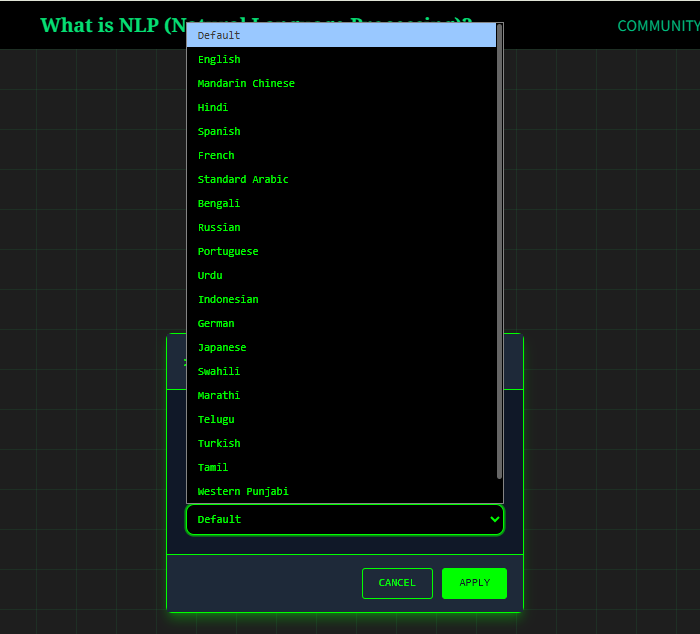
Multilingual Support
Whether you're watching content in English, Spanish, French, Mandarin, or beyond, Y2Doc delivers accurate transcripts tailored to your language. Y2Doc can also transcribe YouTube videos to any other languages directly.
-
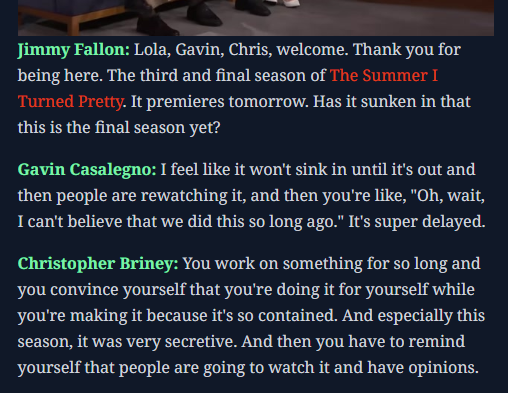
Structured Transcripts with Speaker Labels
With speaker names clearly marked, transcripts become far easier to follow, especially in multi-person videos like interviews or discussions. Instead of guessing who said what, readers can instantly attribute quotes, review arguments, or track viewpoints across the conversation.
-
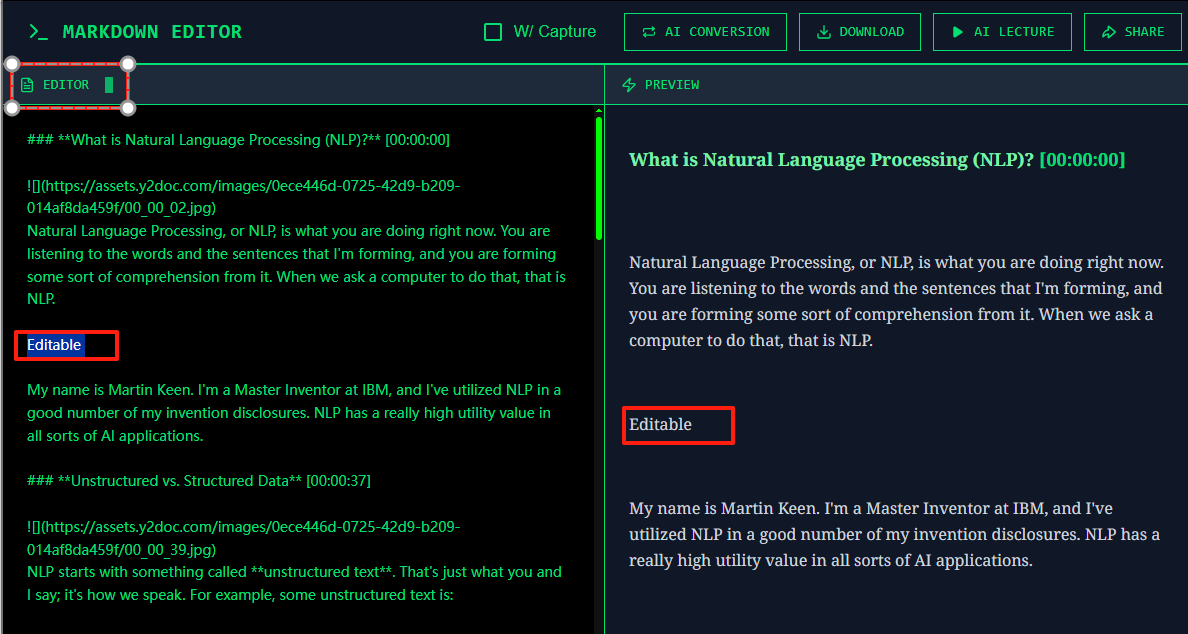
Greater Customization
Y2Doc enables you to export transcript in markdown and edit it online or offline freely. This is perfect for writers, students, and researchers.
Conclusion
YouTube’s built-in captions are a good start, but they are not enough for serious viewers. Whether you’re studying, working, or creating content, using a reliable YouTube transcript generator like Y2Doc gives you clearer, more accurate, and more flexible results.
Try Y2Doc today and turn any video into an editable, easy-to-follow transcript, tailored to how you actually watch and learn.
✍️ Editorial & Generation Note
This content was originally generated with the assistance of Y2Doc's AI to quickly extract and structure information from video sources. It has been carefully reviewed, edited, and verified by our human editorial team to ensure accuracy, safety, and helpfulness.