Step-by-Step Guide to Converting YouTube Shorts to MP4
YouTube Shorts have taken the internet by storm, showcasing a wide range of content, from bite-sized tutorials and entertaining clips to thought-provoking commentary and engaging mini-documentaries. While Shorts offer a quick and easy way to enjoy content on the move, there's a significant drawback: they are intended for online viewing only. If you've ever found yourself wanting to save a YouTube Short as an MP4 for offline viewing, archiving, or repurposing in a project, you're definitely in good company.
In this guide, we’ll walk you through the most effective way to convert YouTube Shorts to MP4 using Y2Doc, a flexible and user-friendly tool designed for creators, students, and anyone who wants more control over short-form content. Whether you're looking to transcribe a YouTube video, save it as an MP4, or extract just the key points, this step-by-step guide is here to help you get what you need.
The Benefits of Converting YouTube Shorts to MP4?
Have you ever stopped to think about why converting YouTube Shorts to MP4 is such a hot topic? Isn’t Shorts just for quick, disposable content? Yes, but not always. In many cases, these brief videos contain a wealth of valuable insights or serve as a spark for creative inspiration. Here’s why converting them can be a smart move:
Watch Offline Anytime
Converting Shorts to MP4 opens up a world of convenience, allowing you to enjoy them anytime and anywhere, on the plane, in the subway, or in places where Wi-Fi is unreliable. This is especially useful if you're building a personal reference library or saving content you find valuable.
Save Before It's Gone
Unlike full-length YouTube videos, Shorts tend to quickly lost in the feed. If you find a Short that’s useful, converting it to MP4, you can enjoy it forever.
Reuse and Repurpose
Educators, content creators, and video editors may want to clip segments from Shorts to use in lectures, compilations, or social media. MP4 is a universal format that works across all major video editing platforms, making it ideal for repurposing content.
How to Convert YouTube Shorts to MP4 with Y2Doc
Now that you know why you might want to download Shorts, here’s how to do so quickly and easily:
Step 1: Copy the YouTube Shorts Link
Open the YouTube Short you want to convert, then: .
- If on an app: Tap the “Share” button beneath the video, then select “Copy link.”
- If on a web browser: Simply copy the full URL from the address bar while the Short is open.
Tip: Make sure the link is in the format youtube.com/shorts/....
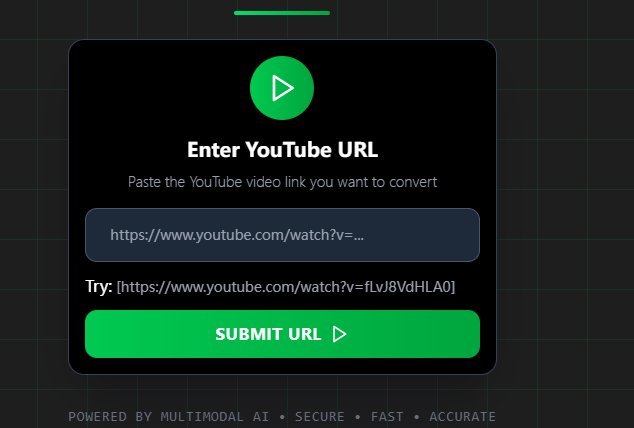
Step 2: Paste the Link
Paste the Shorts URL and click the “SUBMIT URL”.
Step 3: Generate and Download
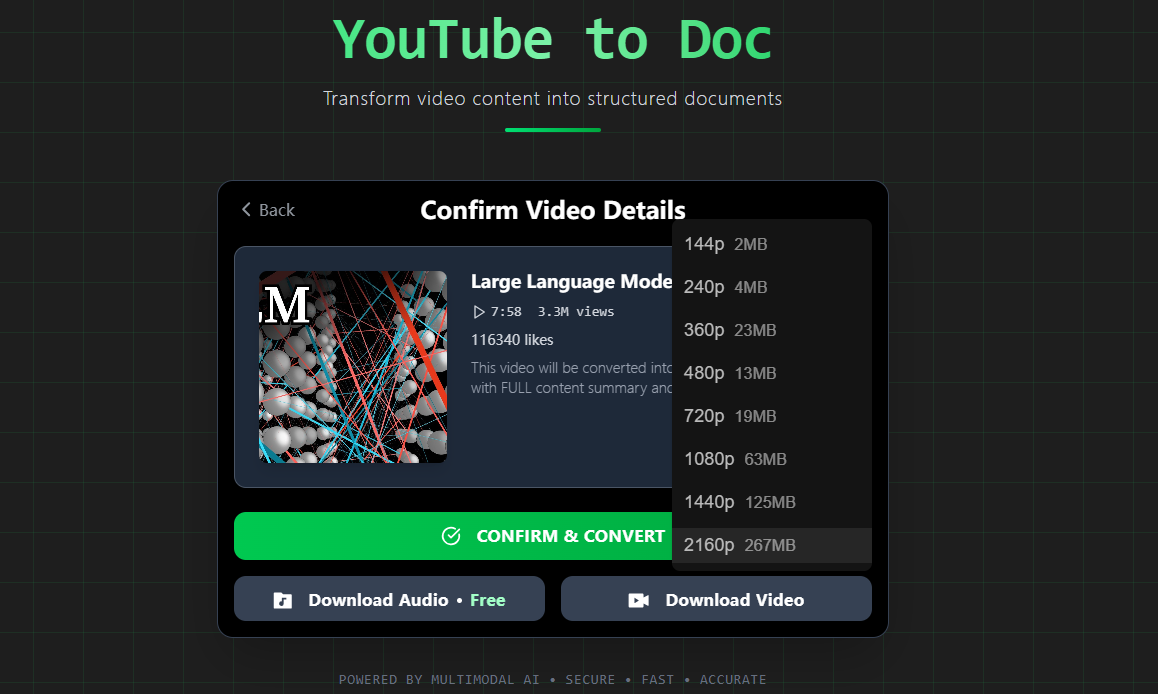
Click “Download Video” to select the video quality, from 144p to 4k. Once select the video quality, Y2Doc will process the video and you will get the video in just a few seconds.
Why Choose Y2Doc for Converting YouTube Shorts to MP4?
Y2Doc is a stable, secure platform built for both casual viewers and dedicated content enthusiasts. You can reliably convert any YouTube Short, even full-length videos up to 4 hours, into MP4 with no watermarks, no ads, and no speed limits.
Whether you're downloading a 30-second meme or a 3-hour documentary-style video, Y2Doc ensures you get fast and high-quality output every single time. You can even choose from multiple resolution options to suit your device or storage preferences, from lightweight mobile-friendly versions to high-definition MP4 files.
In short, Y2Doc delivers a smooth, consistent experience that you can count on. Say goodbye to unexpected errors and any compromise in quality. It’s built for users who want a professional-grade experience while enjoying the ease of a web-based platform.
What Else Can You Do After Downloading a YouTube Short in MP4 Format?
Once your YouTube Short is saved as an MP4, Y2Doc gives you tools to maximize the potential of your short-form content. These features help you slow down, analyze, and repurpose them with ease because Shorts are fast-paced and packed with information.
You can extract the audio as a clean MP3 file which is perfect for listening to a tutorial, a language-learning Short, or an inspiring clip while on the go. For deeper review, Y2Doc can generate a structured transcript with timestamps, speaker labels, and optional screenshots. These features are ideal for dissecting quick tips, step-by-step guides, or multi-speaker Shorts.
Want more than just text? Y2Doc’s AI Lecture can turn any video into a clear, structured explanation, making it easier for learners, researchers, or professionals to fully absorb and apply the content.
Y2Doc is your go-to tool for turning YouTube Shorts into valuable resources, whether you’re archiving a creative piece, studying a bite-sized lesson, or integrating it into a presentation.
Conclusion
YouTube Shorts seems like a quick hit of entertainment, but with the right tools, they can become lasting assets in your personal or professional library. By converting YouTube Shorts to MP4 with Y2Doc, you are opening up a world of possibilities, such as watching offline, preserving disappearing content, and repurposing clips for creative use.
Y2Doc combines speed, reliability, and flexibility in one platform, supporting high-quality downloads, multiple resolutions, and other advanced features like MP3 extraction, structured transcripts, and AI-powered explanations. Whether you’re a casual viewer enjoying keeping your favorite clips or a creator building an extensive content library, Y2Doc makes the process simple, fast, and dependable.
Give Y2Doc a try, and begin the journey of converting your favorite YouTube Shorts today! Transform those fleeting videos into valuable resources that you can enjoy, study, and share for years ahead.
✍️ Editorial & Generation Note
This content was originally generated with the assistance of Y2Doc's AI to quickly extract and structure information from video sources. It has been carefully reviewed, edited, and verified by our human editorial team to ensure accuracy, safety, and helpfulness.