How to Get Accurate YouTube Transcripts for Technical and Academic Videos with Y2Doc
How to Get Accurate YouTube Transcripts for Technical and Academic Videos with Y2Doc
YouTube has quietly become one of the largest learning spaces online. People use it to review a tricky part of a lecture, follow a coding tutorial, or catch details from a recorded talk. In those moments, a YouTube video transcript decides how much can actually be understood and remembered. A clean YouTube transcript supports attention, memory, and comprehension. For learners less fluent in the language, they often make the difference between keeping up and getting lost, while advanced learners can integrate audio, video, and text cues more flexibly.
But transcripts only work when they are accurate. And that is where YouTube’s automatic system often breaks down.
Why Auto-Captions Can’t Replace an Accurate Transcript for YouTube Videos
YouTube’s built-in captions use automated speech recognition (ASR) to process audio. While fast, this approach has inherent weaknesses, especially when the content is full of jargon or multiple speakers.
Common Issues
- Mistranscribed technical terms: In programming tutorials, commands and library names are often misheard. In science videos, specialized vocabulary may turn into unrelated words.
- No punctuation: Without commas and periods, ideas blur together, which makes viewers to mentally fix the text as they read.
- Arbitrary line breaks: Sentences are broken randomly, interrupting the flow and making it harder to follow.
- Accent sensitivity: Strong accents or fast speech can significantly reduce accuracy.
These issues mean you must constantly pause, rewind, and interpret the captions before you can absorb the content, reducing productivity and increasing frustration.
Real Examples of Caption Failures
- Example 1
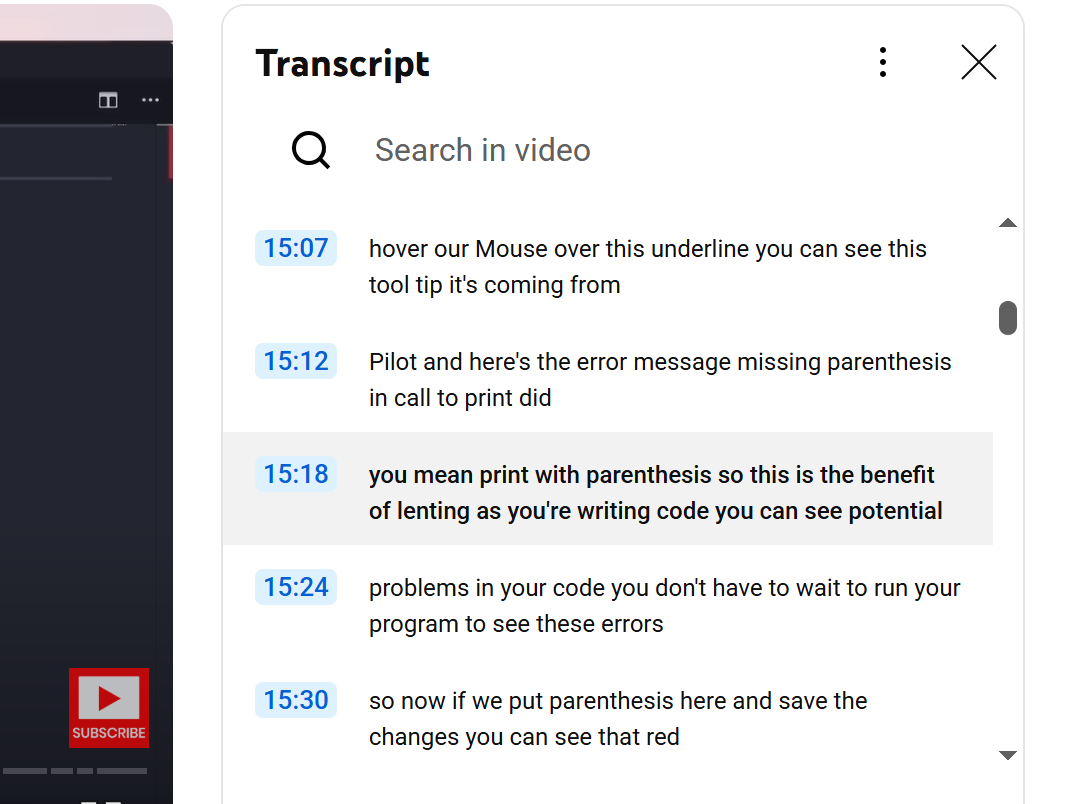
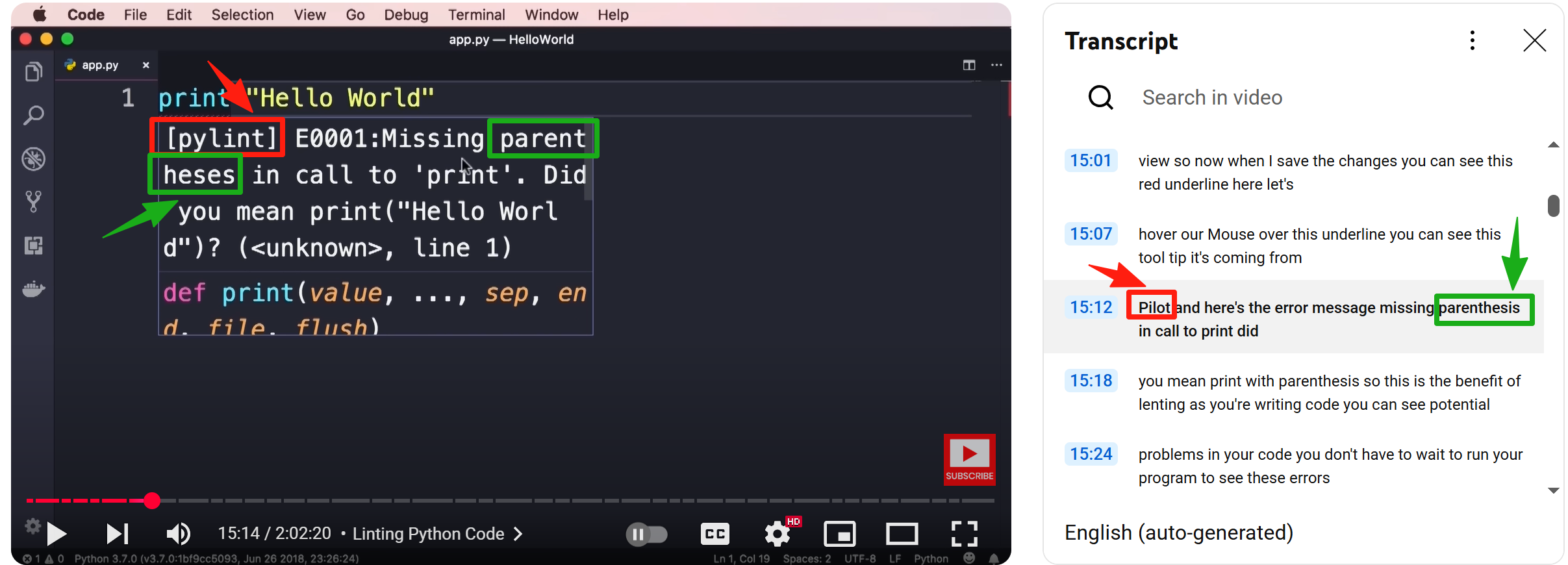
Here, the key term “pylint” was replaced with “pilot,” and “parentheses” was wrongly spelled and cut into two words, completely losing its meaning.
- Example 2
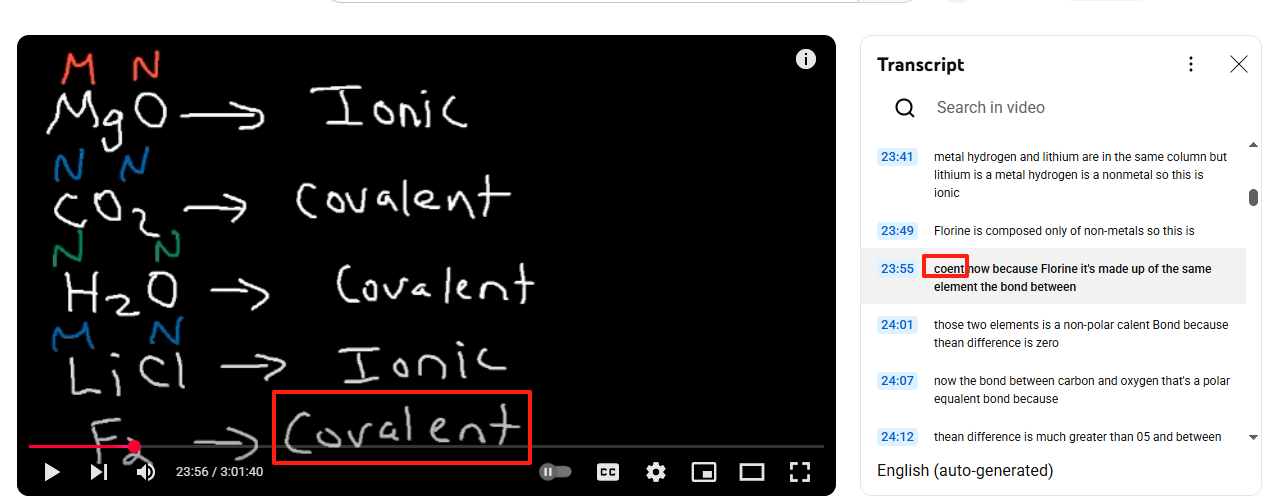
In a chemistry lecture, “covalent” was misheard as “covent,” potentially misleading students who rely on a transcript for YouTube videos for note-taking.
These examples show that for technical or academic videos, a single transcription error can distort the entire concept being taught.
Use Y2Doc to Overcome Caption Shortages and Get Ready-to-Use Notes
When a single error may derail an entire lesson, the solution must go deeper than superficial fixes. Y2Doc approaches the video to text process on several levels:
Vocabulary accuracy
Y2Doc is an AI-powered tool embedded with the models trained with both everyday language and technical domains. That means it recognizes terms in coding, chemistry, or academic talks that often trip up generic auto-captions. By getting the words right, Y2Doc removes the risk of learners being misled.
Sentence clarity
Y2Doc uses natural language processing to restore punctuation and rebuild sentences. The transcript flows like regular writing, making it easier to follow without constant rereading.
Structured format
Once words and sentences are reliable, Y2Doc organizes the transcript into headings, bullet points, and highlighted terms. This turns the output into a resource closer to class notes than raw subtitles.
It’s also the kind of material that slips naturally into a personal knowledge base, as we described in
this guide on building a video-enhanced PKB.
Integrated screenshots
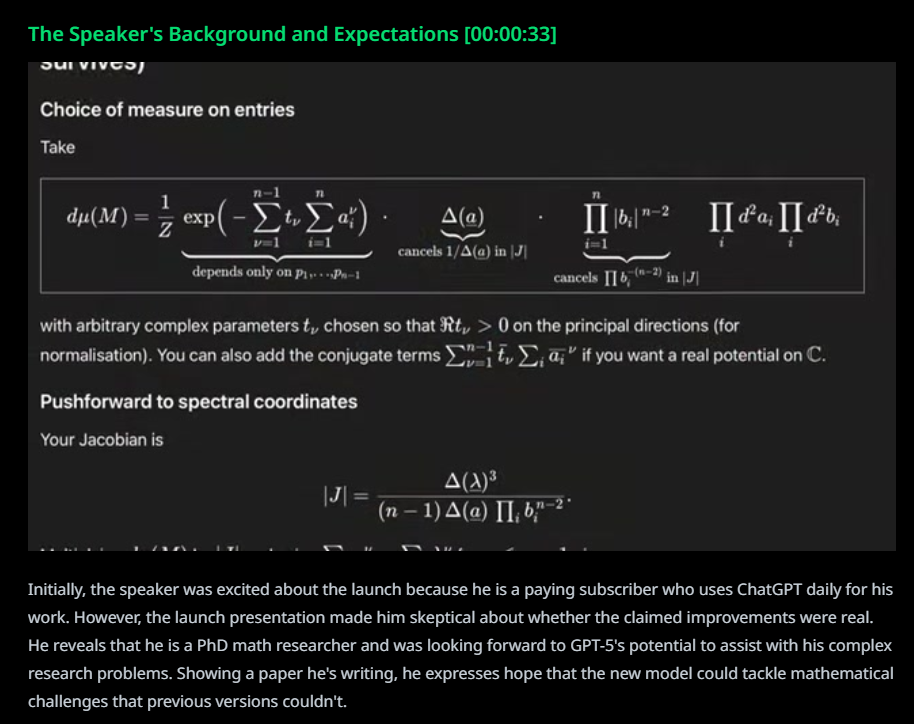
For subjects where meaning depends on more than words—math formulas, code snippets, slides—Y2Doc captures still frames and embeds them into the transcript. This keeps the visual context tied to the explanation, which makes strong contributions to study and review.
Together these layers shift the experience from patching broken captions to reading material that supports learning directly.
Benefits of Y2Doc’s Distinguished YouTube Transcripts
Students spend hours with long lectures, but the knowledge slips away once the video ends. Scrubbing through timelines to find a formula or key term wastes time. Y2Doc changes this by producing transcripts that read like notes—clear sections, highlighted keywords, and screenshots that keep equations in place. Reviewing becomes faster and less frustrating.
Researchers need precision. One wrong transcription of a compound or algorithm can ruin a reference. Y2Doc’s models handle technical terms correctly and capture visuals like charts or formulas, so the transcript becomes a reliable source they can cite, annotate, and store with confidence.
Content creators repurpose constantly. Normally drafting scripts or articles from raw footage take hours. Y2Doc’s article mode and export options cut that process to minutes. They can turn one video into an article or a newsletter to publish without breaking focus on the creative work.
Teams rely on knowledge that moves quickly. Instead of sending colleagues a two-hour video, they can share a transcript link, attach a PDF, or post highlights directly. Structured sections and keywords make it easy for everyone to find what matters and act on it right away.
Accurate transcripts do more than fix captions. They turn YouTube into a dependable knowledge base—something you can directly study from, quote with accuracy, and reuse across projects.
Productively Turning Captions into Knowledge with Y2Doc
Y2Doc delivers transcripts that are accurate, structured, and ready to use. You can read them like notes, search them like documents, and share them without friction.
Can't wait to see how productively you work? Start to transcribe your any YouTube video with Y2Doc today.
✍️ Editorial & Generation Note
This content was originally generated with the assistance of Y2Doc's AI to quickly extract and structure information from video sources. It has been carefully reviewed, edited, and verified by our human editorial team to ensure accuracy, safety, and helpfulness.