How to Build a Video-Enhanced Personal Knowledge Base
Ever feel like your “Watch Later” list has turned into a graveyard of good intentions? You save lectures, tutorials, and keynotes hoping to learn from them, only to realize weeks later that you never returned. Meanwhile, the videos keep piling up, and valuable insights slip away.
This is not just a matter of procrastination; it’s a problem of structure. YouTube has become one of the largest learning platforms in the world, but without a system to capture and organize what you watch, most of that knowledge fades. The solution lies in building a personal knowledge base (PKB), sometimes described as your second brain.
A PKB is more than a notebook or a collection of bookmarks. It’s a personal knowledge management (PKM) system that transforms fleeting inputs into connected, retrievable, and actionable insights. When so much of our learning happens on YouTube, a PKB without video integration is incomplete.
The Challenges of Video-Based Knowledge
Of all the media we consume, video is both the richest and the hardest to manage.
- Information overload: Over 500 hours of video are uploaded to YouTube every minute. Finding what matters is overwhelming.
- Time-consuming transcription: Manually converting spoken content into notes is not realistic for a 2-hour lecture or a 90-minute interview.
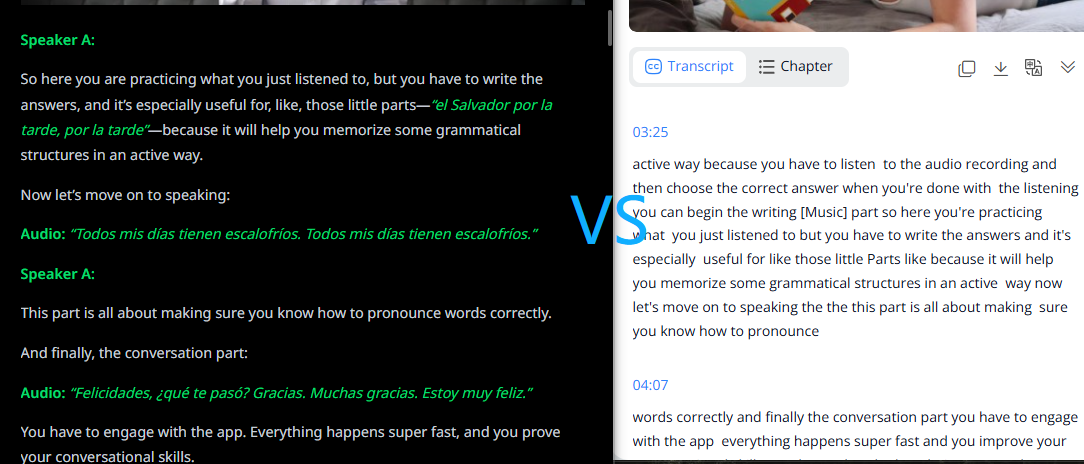
- Unreliable captions: YouTube’s automatic captions often mistranscribe technical terms, struggle with accents, or loss nuance. We’ve shown in another article how caption errors derail learning in real-world cases.
- Lack of structure: Even when transcripts exist, they are usually long blocks of unformatted text. Imported into a PKB, they become clutter rather than knowledge.
These challenges explain why so many of us “save videos for later” but rarely return to them. What’s missing is a bridge between YouTube and your PKB.
Why a PKM System Needs Video Integration
Tools like Notion, Obsidian, or Evernote already help us organize documents and notes. They support tagging, cross-linking, and full-text search. But when it comes to video, the pipeline breaks down.
Imagine a product manager preparing for a competitor analysis. They remember a launch video where a rival mentioned a feature roadmap, but they don’t recall the timestamp. A text-heavy PKB won’t help here, because the insight is locked inside a video. With Y2Doc, that same launch video can be transcribed, structured, and tagged. The manager can jump directly to the section on “pricing strategy” or “data privacy” with a single search.
This is the difference between a PKB that simply stores text and one that reflects the full diversity of how we learn today.
Step-by-Step Guide to Building a Practical Workflow
So how do you move from YouTube chaos to an organized PKB? Here’s a practical three-step workflow.
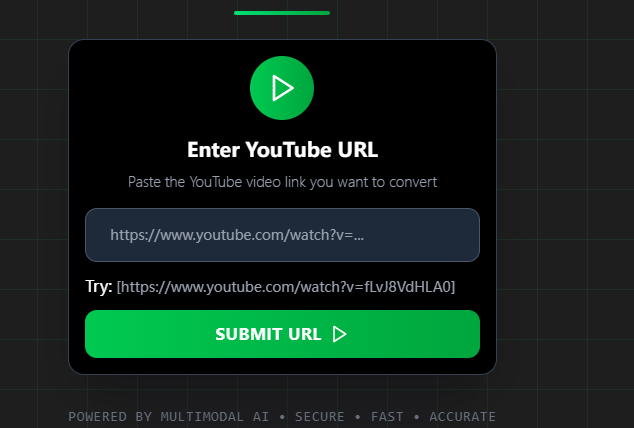
Step 1: Capture (with Y2Doc)
Paste a YouTube link into Y2Doc. Within seconds, it generates a structured transcript or summary with timestamps, subheadings, and highlighted terms. It supports videos up to four hours long, covering even full lectures or webinars.
Step 2: Organize (Your PKB Tool of Choice)
Import the Y2Doc output into Notion, Evernote, Obsidian or any other all-in-one note taking apps you prefer. Then:
- Categorize by theme: AI tutorials, case studies, medical lectures.
- Add tags by concept: machine learning, negotiation, marketing strategy.
- Add tags by use case: exam prep, interview prep, pitch deck material. This makes retrieval more contextual, and you’ll find the transcript when you actually need it.
- Link related notes to form a web of connected knowledge.
Step 3: Apply (Turning Knowledge into Action)
Once your PKB holds structured transcripts, retrieval is effortless. Instead of rewatching a 90-minute panel, you can search “regulatory trends” and land on the exact passage. Preparing for a client meeting? Pull out a summarized case study. Over time, your PKB develops into a living system of knowledge, always ready to support new projects and ideas.
Usage Scenarios: Who Benefits from This Workflow?
The promise of a video-enhanced PKB becomes clearer when we look at real users.
Language learners
In a typical 45-minute language lesson on YouTube, useful phrases and grammar points are scattered across the video. You might remember hearing an expression but spend minutes dragging the timeline back and forth to locate it. With Y2Doc, the class is transcribed into sections with timestamps and key terms. You can go straight to the part where the teacher introduces a phrase and save it to your PKB for review.
Lawyers and consultants
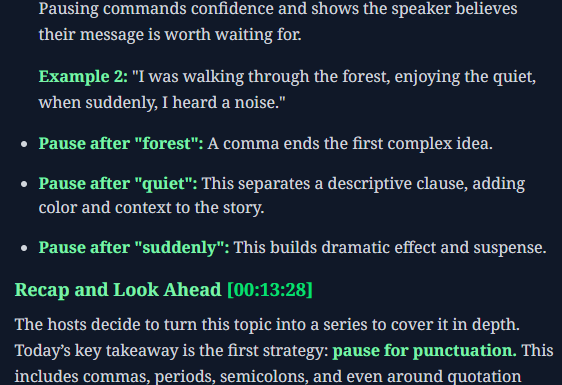
Industry panels often run long, with valuable references hidden in passing remarks. A consultant may recall that a speaker mentioned a precedent but struggle to track down the exact wording weeks later. Y2Doc produces a transcript with subheadings and searchable keywords, so typing your keywords brings up the relevant exchange instantly. What was once buried in a two-hour discussion becomes a clear note you can cite in client work.
Product managers
Product launches on YouTube mix marketing talk, feature demos, and audience questions. Watching several back-to-back to compare strategies is exhausting. With Y2Doc, each recording can be processed into a concise summary. Feature updates and pricing details are pulled out clearly, making it easier to line them up side by side in your PKB for competitive analysis.
Researchers and academics
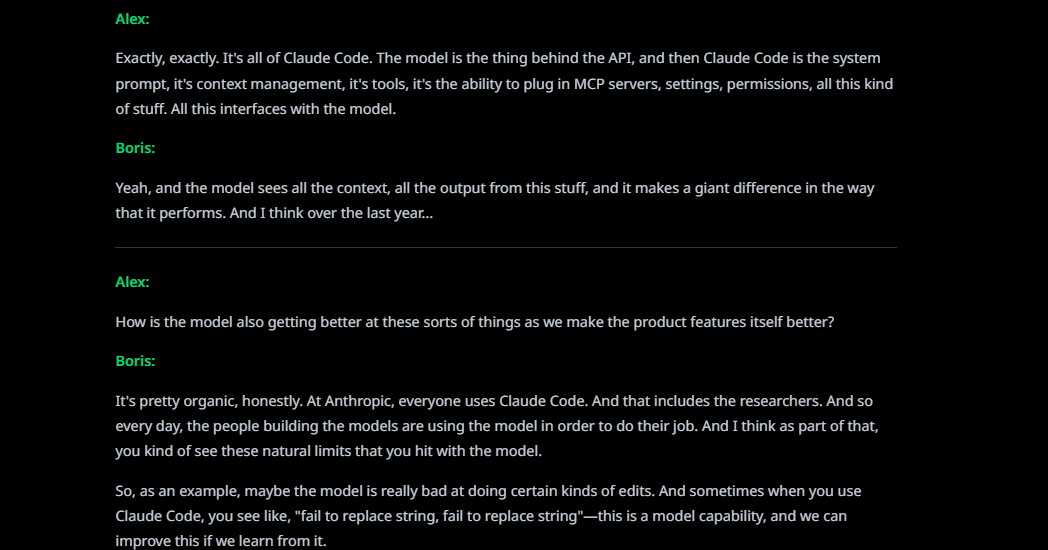
Conference panels or expert interviews often feature multiple speakers, and without labels it’s hard to know who said what. Y2Doc’s conversation mode keeps track of speaker turns, so transcripts show exactly which expert made each point. When stored in a PKB, these records help researchers follow different perspectives, quote accurately, and map out debates more effectively.
These cases highlight a simple shift: YouTube videos no longer sit in a “watch later” list, half-forgotten. With Y2Doc and a PKB, they become part of a structured library that grows with your work and study.
Advanced Tips for Building a Video-Enhanced PKB
- Choose your export format wisely: Y2Doc allows TXT, Markdown, and PDF downloads.
- Combine modes strategically: Use “default” mode for detailed but structured transcripts, “summary” mode for quick reviews, and “conversation” mode for panel discussions.
- Tag for future you: Beyond topics, tagging by use case, exam prep, interview prep, or project brainstorming, is more useful for you to make retrieval when you need them for a particular purpose.
- Regular reviews: A PKB grows over time. Set aside weekly or monthly sessions to refine and link notes, so the system grows in step with your learning.
FAQ
Q1: How is Y2Doc different from YouTube’s built-in captions?
Captions are often inaccurate and lack structure. Y2Doc produces clean transcripts with highlights, speaker labels, and exportable formats.
Q2: Can I use Y2Doc for any video?
Currently, Y2Doc works specifically with YouTube videos, covering the majority of their video-based knowledge sources.
Q3: What’s the maximum length supported?
Y2Doc can process videos up to four hours long, suitable for full lectures, panels or webinars.
Q4: How do I integrate Y2Doc outputs with my PKB?
Export transcripts in TXT, Markdown or PDF, then import them into tools like Notion, Evernote, or Obsidian for organization and retrieval. You can also tag and link as you would any other note.
Conclusion: Take Control of Your YouTube Knowledge
The vision of a personal knowledge base, or a second brain, is no longer just about saving articles or notes. With so much knowledge living on YouTube, a PKB without video integration is incomplete.
Tools like Y2Doc strengthen the input stage of your PKM system. It turns hours of video into structured, searchable knowledge, ensuring your PKB reflects not only what you read but also what you watch and learn.
Ready to stop watching and start learning? Take control of your YouTube knowledge with Y2Doc, and start building your second brain today.
✍️ Editorial & Generation Note
This content was originally generated with the assistance of Y2Doc's AI to quickly extract and structure information from video sources. It has been carefully reviewed, edited, and verified by our human editorial team to ensure accuracy, safety, and helpfulness.