How to Extract Transcripts from YouTube
YouTube has become a daily reference point for lectures, interviews, tutorials, and podcasts. For many viewers, saving a video as text is the easiest way to study, search, or reuse the material. This is why “YouTube transcript extractor” remains a popular search.
Traditional extractors usually serve one purpose: to take YouTube’s captions or an automatic transcription, and turn it into a plain text file. While this meets the basic speech-to-text need, plain transcripts often fall short when the video is long, the content is specialized, or multiple speakers in the video. Users increasingly want more than a verbatim record; they need text that is practical to read, navigate, and adapt.
What a Transcript Extractor Usually Provides
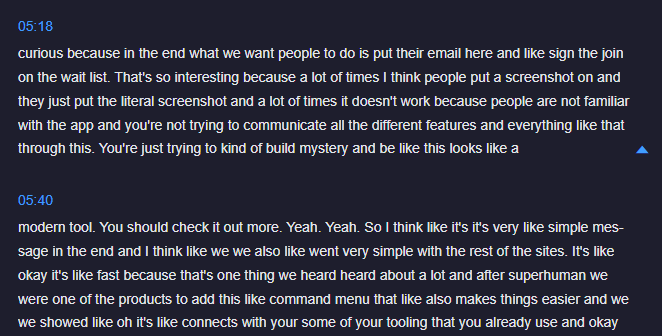
A typical extractor produces a raw transcript. The output may come with rough punctuation or occasional time markers, but more often it is just a long, unbroken wall of text. People tend to use this kind of tool for a few straightforward purposes:
- Saving captions to view a video offline.
- Reading alongside a video when learning a language.
- Quoting a video for research or publication.
For simple references, this is sufficient. The limitations appear once you try to study, review, or analyze the material in any depth. Word-for-word transcripts quickly reveal their limits.
The Limitations of Word-for-Word Extractors
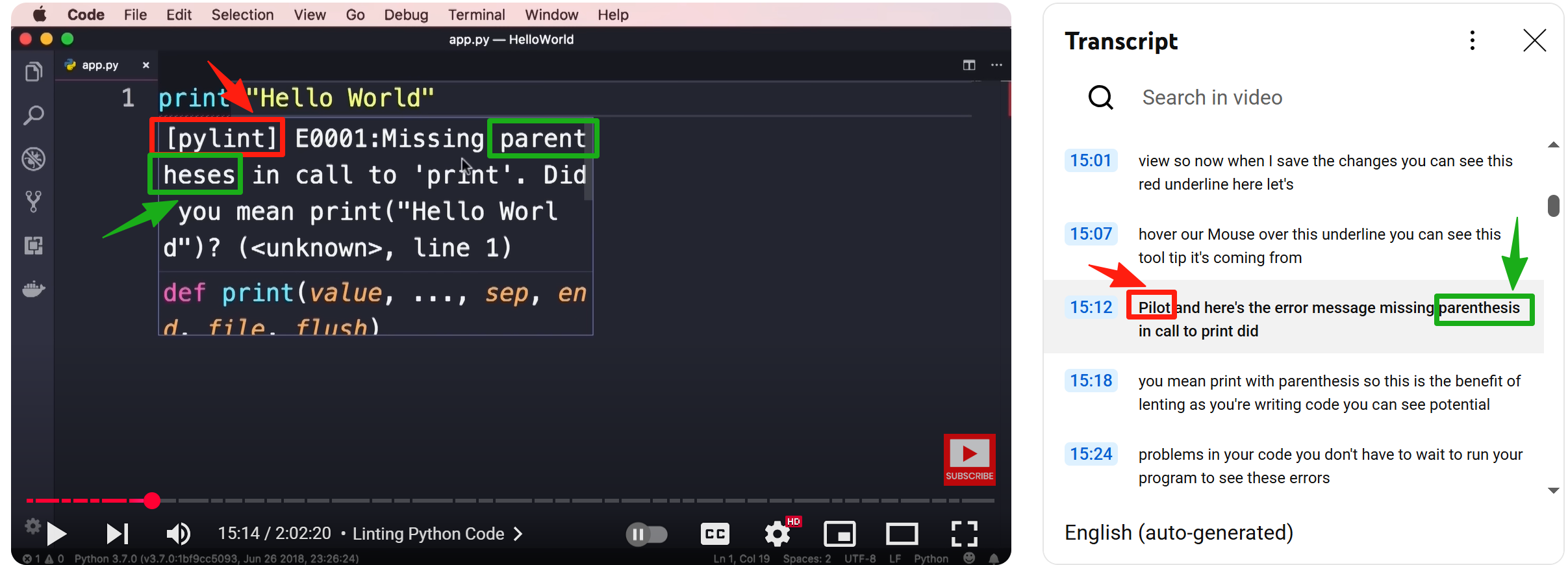
1. Accuracy in specialized fields
Speech recognition technology still struggles with technical terms, proper nouns, and industry-specific language. In areas such as IT or chemistry, a single misheard word can change the sense of a sentence and mislead the reader.
2. Poor formatting and readability
Many extractors return a block of text with no real structure. It is difficult to trace the argument or see where one section of the talk ends and another begins.
3. Low efficiency for study and reuse
Because everything is recorded verbatim, useful ideas are buried inside long streams of filler and repetition. Users often have to reformat, highlight, and reorganize the text themselves, essentially doing the work twice.
Why Smarter Extractors Matter
Traditional extractors are designed to preserve. Smarter extractors are designed to help you learn, analyze, and repurpose.
What sets a smarter extractor apart is the way it reshapes raw text into something you can actually use. Instead of handing you one endless paragraph, it divides the material into recognizable topics so you know exactly where each idea begins. Within those sections, the main arguments are spelled out in a way that makes them easy to pick up later, almost like notes you might take yourself while watching. Each passage also carries a simple time reference. That means you can jump back to the video the moment a formula is introduced, or replay a speaker’s example without hunting through the entire timeline. By combining structure with context, the transcript stops being a passive record but turns into a working document you can study, annotate, and reuse.
What Y2Doc Makes Possible
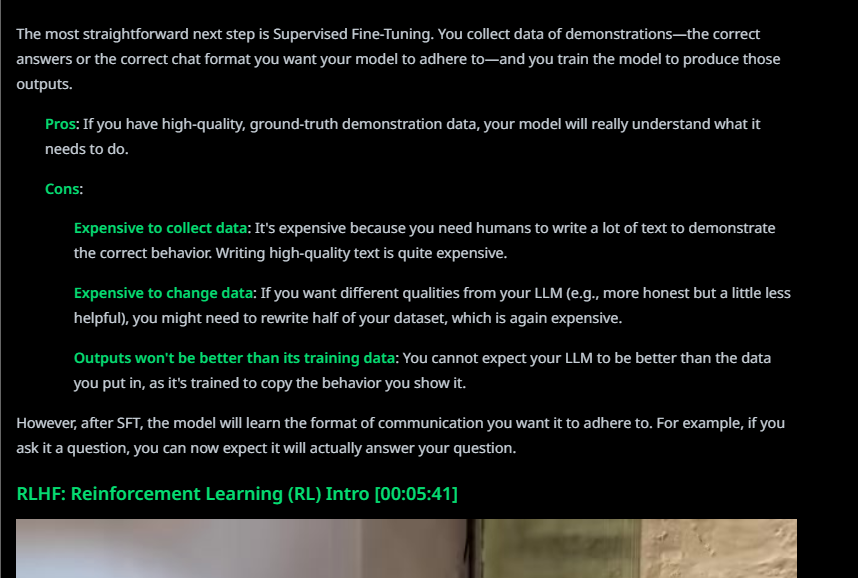
The idea of a smarter extractor becomes practical when you look at how Y2Doc handles transcripts. Instead of producing a raw block of text, it adds layers of organization and context so that the text serves as a real working resource.
- Structured output: The default transcript comes with timestamps, section headings, and bullet points.
- Keyword highlighting: Important terms and concepts are emphasized for easier navigation.
- Multiple modes: Beyond the default, users can choose Conversation mode (with speaker labels), Summary mode, Article and Product Review modes for publishing, or even Email format for sharing.
- Language support: Y2Doc can transcribe videos in their original language and also render them directly into more than twenty others, including German, Mandarin, Hindi, Spanish, Standard Arabic, French, Japanese and more.
- History and sharing: Transcripts can be saved along with a clickable YouTube icon for jumping to the original video conveniently, exported as TXT, PDF and Markdown, or shared directly on social media.
This approach transforms transcripts from a static record into a flexible resource for study, research, or content creation.
Simple Steps to Use Y2Doc
Getting started with Y2Doc is straightforward. You don’t need to install any software. Just follow these quick steps in your browser to turn a YouTube video into a structured transcript:
Step 1. Copy the URL of the YouTube video you want to process
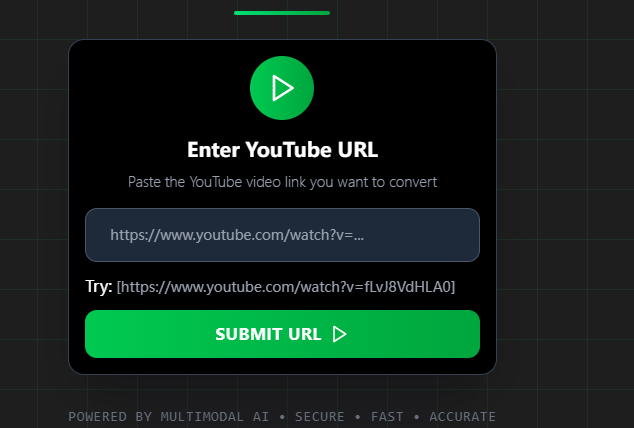
Step 2. Paste the URL into Y2Doc’s input field
Step 3. Click the “SUBMIT URL”
Step 4. Click the “CONFIRM & CONFIRT” to get structured transcripts
Conclusion
Transcript extractors answer a simple need: turning video into text. For quick reference or casual use, a plain transcript is enough. But when the goal is deeper, studying, researching, or reusing content, structure matters as much as accuracy.
Y2Doc positions itself as a smarter extractor. It keeps the benefits of transcription, but organizes the output so users can read, navigate, and apply it directly.
If you are looking for a reliable YouTube transcript extractor, consider not just what captures the words, but what helps you use them. Y2Doc is the very choice.
✍️ Editorial & Generation Note
This content was originally generated with the assistance of Y2Doc's AI to quickly extract and structure information from video sources. It has been carefully reviewed, edited, and verified by our human editorial team to ensure accuracy, safety, and helpfulness.