Fast & Free YouTube MP3 Downloader
Want to save your favorite YouTube content as audio? A YouTube MP3 downloader can be incredibly useful for building offline playlists, capturing lectures, or extracting podcast-style clips from videos.
That’s where Y2Doc, a free browser-based YouTube MP3 downloader, comes in.
Downloading YouTube MP3s Shouldn’t Be Complicated
Extracting audio from a YouTube video, whether it’s a podcast, interview, talk, or music clip, should be simple and efficient. Y2Doc provides a clean way to convert videos into MP3 format directly in your browser. No setup required. Just paste the link, and the audio is ready.
How It Works in 3 Simple Steps
Step 1: Paste the YouTube Link
Copy the video URL from YouTube and paste it into Y2Doc’s input field.
Step 2: Click “SUMBIT URL”
The system begins processing your video immediately.
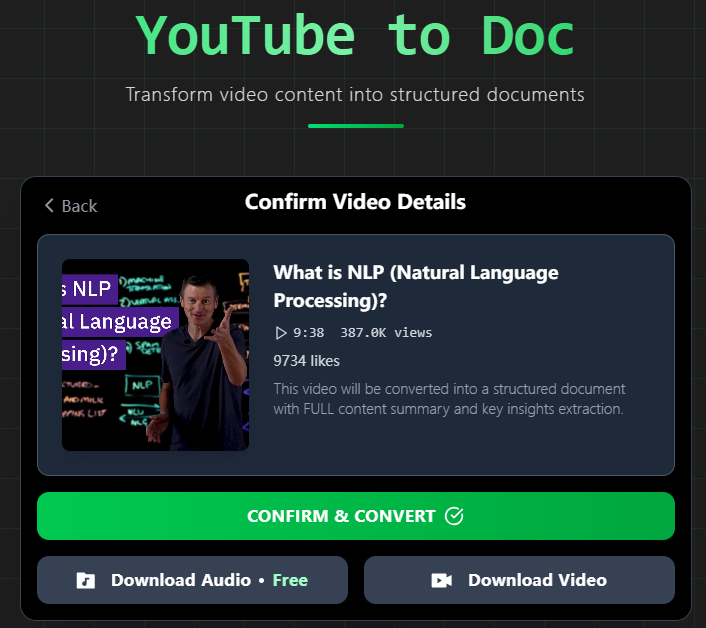
Step 3: Choose “Download Audio”
Select the audio option and your MP3 file will be ready in seconds, completely free.
Key Features You’ll Appreciate
- Browser-based and lightweight: Access from any devices, anytime, without installing software.
- Fast MP3 extraction: Convert a 20-minute YouTube video within 4 seconds. With optimized servers, we deliver blazing fast conversions so that you wait less and listen more.
- High audio clarity: Experience crystal-clear audio. Our advanced processing preserves your original videos' fidelity, so you get studio-quality sound with every play.
- Free to use: Completely FREE to use. Enjoy unlimited, high-quality MP3 downloads without spending a dime.
It’s simple, but not simplistic. The tool is designed for users who just want to get their content, use it, and move on.
Common Use Cases for MP3 Downloads
Not everyone downloads audio for the same reason. Some people are saving time; others are creating something new. Here’s where a YouTube MP3 downloader like Y2Doc fits in:
- Students: Save audio from lectures, explainer videos, or case studies and listen while commuting.
- Language learners: Download native interviews or lessons to build playlists and reinforce listening.
- Content creators: Use audio from your own published videos as voiceovers, reference files for editing, or as reference files to transcribe, translate, or refine your script.
- Podcast listeners: Turn long-form interviews or discussion videos into audio episodes and listen on the go, just like a regular podcast.
- General users: Archive talks, audiobooks, or guided meditations for offline access.
If it’s spoken, sung, or worth remembering, the MP3 is a click away.
Built for Any Device
No more wondering whether it will work on mobile or wait until you’re back on your laptop. Y2Doc runs seamlessly across all your devices, including mobile phones, tablets, and desktops alike. All you need is a web browser.
Since it’s completely web-based, there’s nothing to install or configure; just copy your YouTube link and you are ready to go.
Your Audio, Your Terms
Enjoy real freedom with your audio. No unnecessary step, no mystifying interface, just pure straight-ahead functionality. Y2Doc gives you a nicely parsed MP3, and you decide how to take advantage of it: as in-depth study, creative remixing, quick reference, or to save for your personal archive.
Whichever way you're meticulously creating a comprehensive resource library collection, rounding up unique clips for a deadline project, or just want to maintain a clean, offline copy of your favorite lectures, talks or songs, Y2Doc gets all this done with unmatchable speed and complete ease.
Ready to change your YouTube-to-audio workflow? Try Y2Doc today and discover a smoother, faster, and more versatile way to enjoy your content.
✍️ Editorial & Generation Note
This content was originally generated with the assistance of Y2Doc's AI to quickly extract and structure information from video sources. It has been carefully reviewed, edited, and verified by our human editorial team to ensure accuracy, safety, and helpfulness.