Free & Feature-Rich YouTube to MP3 Converter
Y2Doc allows you to download audio quickly and easily, along with structured transcripts and flexible export options. You can download MP3 for free on any device as Y2Doc works directly from your browser. No pop-ups, no install requirements, just simple audio extraction and optional text formats that extend how you use the content.
How to Convert YouTube Videos to MP3
Just simple 3 steps:
- Paste a YouTube video link
- Click “Submit URL”
- Click “Download Audio”
Just in a few seconds, your MP3 is ready to go.
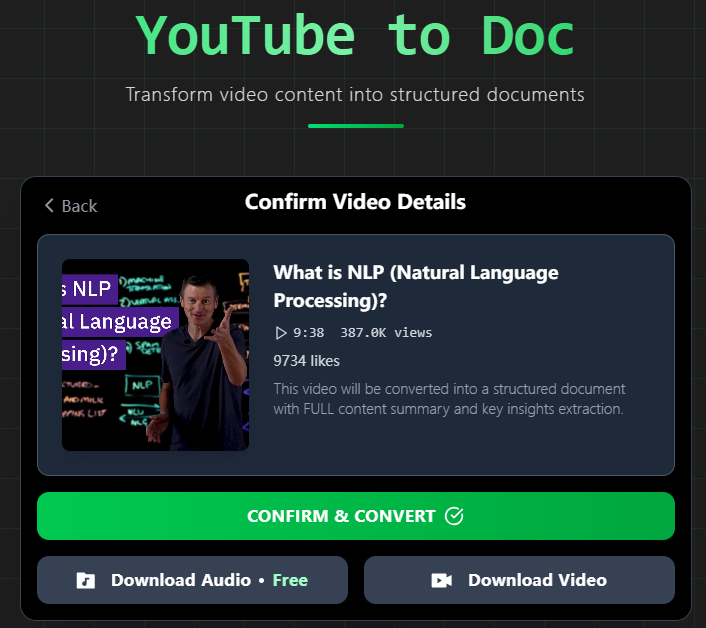
Whether it’s a podcast episode, an interview, a language lesson, or a music video, you can extract the audio alone, and you don’t have to download the whole video file.
When You Might Only Need the Sound
In some situations, audio alone works better than video. For example:
- Learning on the go: Turn hour-long lectures into lightweight MP3s you can listen to during your commute or while you work out
- Language immersion: Get clips in your target language and build a playlist without using up all your data
- Content curation: Extract useful parts from longer panels or streams and add them into your own workflow
- Research and referencing: Save audio records from educational or professional videos to listen to again later to hear the tone and details
You might be able to get the audio out with other tools, but you can do something with Y2Doc.
A Converter That Matches Your Context
Y2Doc is designed for users who value precision, format flexibility, and clean user experience. Once your MP3 is generated, you can choose to:
-
Export the transcript in PDF, Markdown, or TXT
-
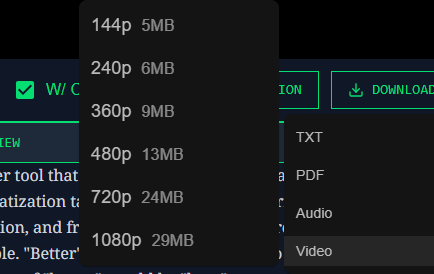
Download the original video in resolutions from 144p to 1080p
-
Go back to your video from your history dashboard, which keeps track of all past uploads and links
And you won’t have to start over if you need to switch formats later. Your source is already organized and saved.
More Than Just a YouTube to MP3 Converter
Downloading MP3 is just a beginning. Y2Doc can do far more than convert.
It can also transcribe and format videos. That means every time you convert a YouTube video into audio, you can simultaneously get:
- Structured transcripts with bullets, timestamps, and headings
- Conversation layouts that separate speakers (with AI-assigned hosts for solo videos)
- Summarized overviews to help you quickly scan the content
- Translations if the original video isn’t in your preferred language
- Image-aware transcripts that keep key visuals in line with the text
The audio file you're downloading is more than simply a clip, whether you want to listen, make notes, or translate it. All the essentials are there.
Conclusion
There have been hundreds of tools that promise to convert YouTube to MP3, but very few consider why you're doing it, or what else you might need next.
Y2Doc takes a smarter approach:
Make the audio available. Make the content usable. Make it easy.
If you’re still using old-school converters that stop at “download”, it might be time to try one that goes further.
Paste a YouTube link, download an MP3, and stay for structured, searchable, and exportable content.
✍️ Editorial & Generation Note
This content was originally generated with the assistance of Y2Doc's AI to quickly extract and structure information from video sources. It has been carefully reviewed, edited, and verified by our human editorial team to ensure accuracy, safety, and helpfulness.